1. Summary
Native iframe lazy-loading doesn’t work for browsers, that support it without polyfill if I use gemini-scrollbar.
2. Steps to reproduce
- Open the
Network section of browser developer tools.
- Open URL of the MCVE file.
- Scroll MCVE file to the bottom and look at Network requests.
3. MCVE
Sources, URL on Repl.it:
<!doctype html>
<html lang="en">
    <head>
        <meta charset="utf-8">
        <meta name="viewport" content="width=device-width, initial-scale=1">
        <title>Kira iframe native lazy-loading + gemini-scrollbar MCVE bug</title>
        <!-- [INFO] Polyfill for browsers that don’t support iframe lazy-loading:
        https://github.com/mfranzke/loading-attribute-polyfill -->
        <script src="https://cdn.jsdelivr.net/npm/loading-attribute-polyfill/dist/loading-attribute-polyfill.umd.min.js" async></script>
        <script src="https://cdn.jsdelivr.net/npm/gemini-scrollbar/index.js" defer></script>
        <link rel="stylesheet" href="https://cdn.jsdelivr.net/npm/gemini-scrollbar/gemini-scrollbar.min.css">
        <style>
        	html {
        		height: 100%;
        	}
        	p {
        		margin-bottom: 200rem;
        	}
        </style>
        <script>
        	window.onload = function() {
        	    var scrollbar = new GeminiScrollbar({
        	        element: document.querySelector("body")
        	    }).create();
        	};
        </script>
    </head>
    <body>
    	<p>Kira Genius!</p>
    	<noscript class="loading-lazy"><iframe loading="lazy" src="https://video.ploud.fr/videos/embed/5d800b76-c468-4510-b2af-d84d28def4a9"></iframe></noscript>
    	<p>Kira Hero!</p>
    	<noscript class="loading-lazy"><iframe loading="lazy" src="https://video.ploud.fr/videos/embed/15613130-601b-4101-bc39-2dde03256254"></iframe></noscript>
    	<p>Kira Amazing!</p>
    	<noscript class="loading-lazy"><iframe loading="lazy" src="https://video.ploud.fr/videos/embed/8c9305e6-671e-4d4d-9abe-e045cc9740df"></iframe></noscript>
    	<p>Kira Goddess!</p>
    	<noscript class="loading-lazy"><iframe loading="lazy" src="https://video.ploud.fr/videos/embed/1c93a77b-371d-446c-a293-6a872a2088a9"></iframe></noscript>
    </body>
</html>
4. Current behavior
For Firefox and Safari, which don’t support lazy loading for iframes by default and works via polyfill, iframes successfully loaded lazy.
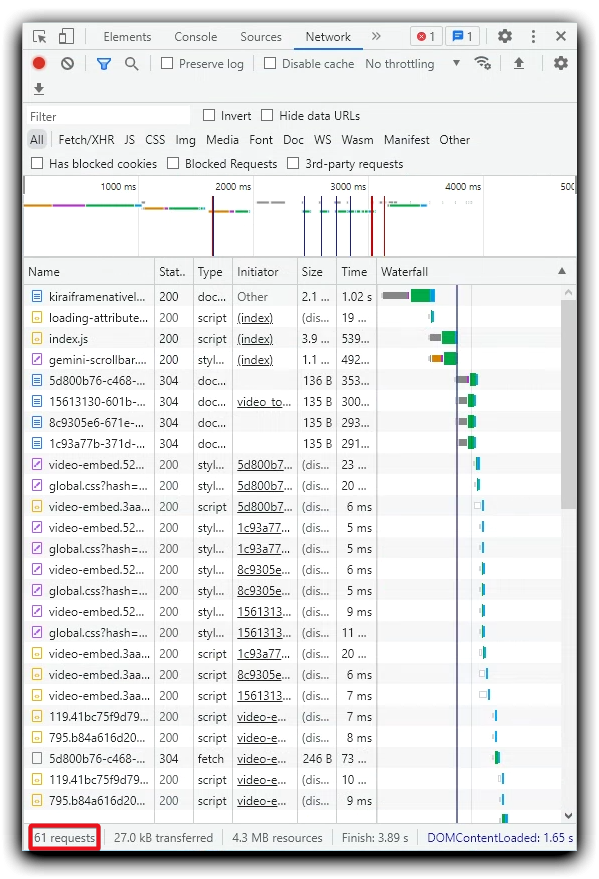
But Chrome, Opera and Edge supporting lazy loading for iframes by default, all iframes content are loaded immediately when the URL is opened. No lazy loading. It’s very bad for web performance.
5. Behavior without gemini-scrollbar
I give here an example without a custom scrollbar to demonstrate that the bug related to gemini-scrollbar.
5.1. MCVE
Sources, URL on Repl.it:
<!doctype html>
<html lang="en">
    <head>
        <meta charset="utf-8">
        <meta name="viewport" content="width=device-width, initial-scale=1"
+       <title>Kira iframe lazy-loading MCVE</title>
-       <title>Kira iframe native lazy-loading + gemini-scrollbar MCVE bug</title>
        <!-- [INFO] Polyfill for browsers that don’t support iframe lazy-loading:
        https://github.com/mfranzke/loading-attribute-polyfill -->
        <script src="https://cdn.jsdelivr.net/npm/loading-attribute-polyfill/dist/loading-attribute-polyfill.umd.min.js" async></script>
-       <script src="https://cdn.jsdelivr.net/npm/gemini-scrollbar/index.js" defer></script>
-       <link rel="stylesheet" href="https://cdn.jsdelivr.net/npm/gemini-scrollbar/gemini-scrollbar.min.css">
        <style>
-        	html {
-        		height: 100%;
-        	}
        	p {
        		margin-bottom: 200rem;
        	}
        </style>
-       <script>
-        	window.onload = function() {
-        	    var scrollbar = new GeminiScrollbar({
-        	        element: document.querySelector("body")
-        	    }).create();
-        	};
-       </script>
    </head>
    <body>
    	<p>Kira Genius!</p>
    	<noscript class="loading-lazy"><iframe loading="lazy" src="https://video.ploud.fr/videos/embed/5d800b76-c468-4510-b2af-d84d28def4a9"></iframe></noscript>
    	<p>Kira Hero!</p>
    	<noscript class="loading-lazy"><iframe loading="lazy" src="https://video.ploud.fr/videos/embed/15613130-601b-4101-bc39-2dde03256254"></iframe></noscript>
    	<p>Kira Amazing!</p>
    	<noscript class="loading-lazy"><iframe loading="lazy" src="https://video.ploud.fr/videos/embed/8c9305e6-671e-4d4d-9abe-e045cc9740df"></iframe></noscript>
    	<p>Kira Goddess!</p>
    	<noscript class="loading-lazy"><iframe loading="lazy" src="https://video.ploud.fr/videos/embed/1c93a77b-371d-446c-a293-6a872a2088a9"></iframe></noscript>
    </body>
</html>
5.2. Result
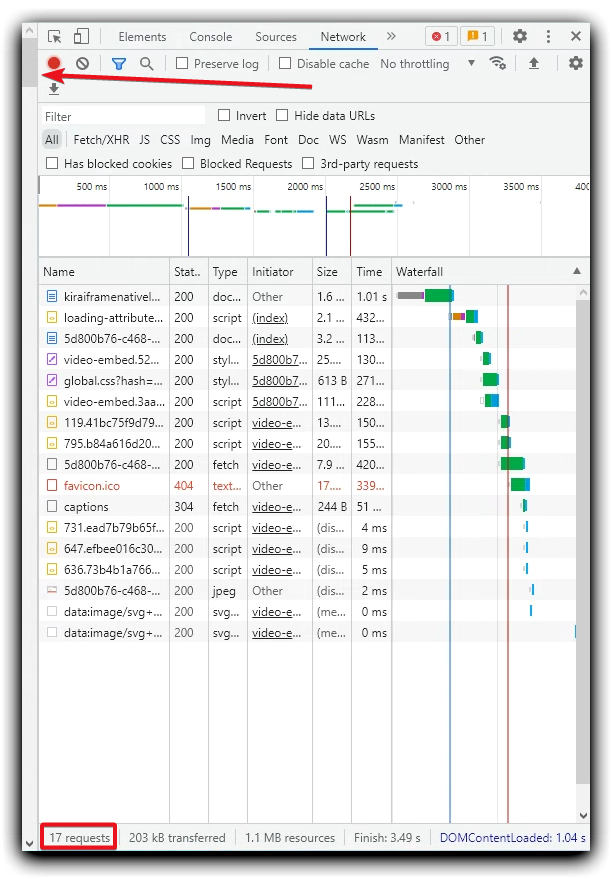
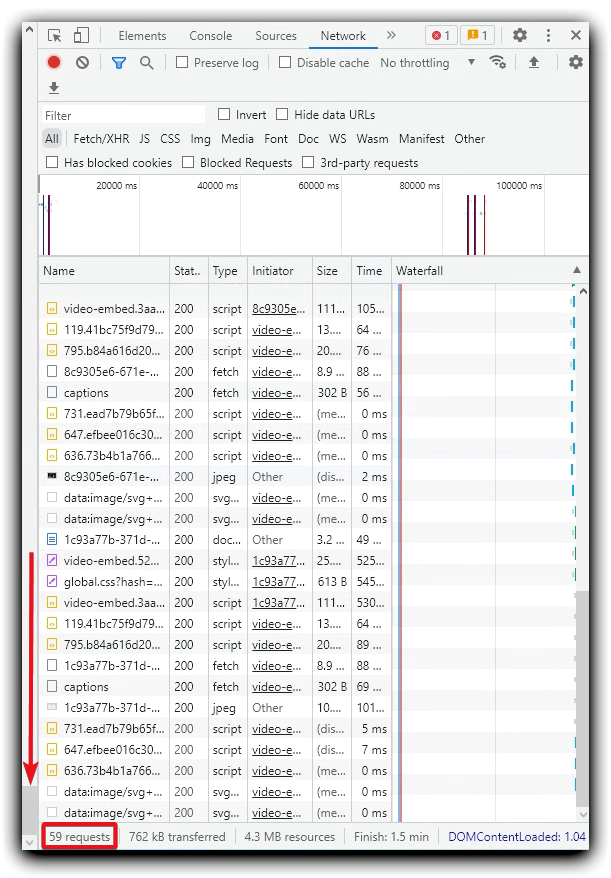
Lazy loading for iframes successfully works for all browsers I tested.
When the page loads, solely the first iframe is loaded:
The remaining 3 iframes are loaded as the page scrolls down:
6. Environment
-
Local:
-
Microsoft Windows [Version 10.0.19041.1415]:
- Firefox 104.0 (64-bit) (Troubleshoot Mode)
- Chromium Version 103.0.5060.114 (Official Build) (64-bit) (with
--disable-extensions and --disable-plugins arguments)
-
BrowserStack:
-
macOS Monterey:
- Safari 15.3
-
Windows 11:
- Opera 89
- Edge 114
Thanks.

1. Summary
Native
iframelazy-loading doesn’t work for browsers, that support it without polyfill if I use gemini-scrollbar.2. Steps to reproduce
Networksection of browser developer tools.3. MCVE
Sources, URL on Repl.it:
4. Current behavior
For Firefox and Safari, which don’t support lazy loading for iframes by default and works via polyfill, iframes successfully loaded lazy.
But Chrome, Opera and Edge supporting lazy loading for iframes by default, all iframes content are loaded immediately when the URL is opened. No lazy loading. It’s very bad for web performance.
5. Behavior without gemini-scrollbar
I give here an example without a custom scrollbar to demonstrate that the bug related to gemini-scrollbar.
5.1. MCVE
Sources, URL on Repl.it:
<!doctype html> <html lang="en"> <head> <meta charset="utf-8"> <meta name="viewport" content="width=device-width, initial-scale=1" + <title>Kira iframe lazy-loading MCVE</title> - <title>Kira iframe native lazy-loading + gemini-scrollbar MCVE bug</title> <!-- [INFO] Polyfill for browsers that don’t support iframe lazy-loading: https://github.com/mfranzke/loading-attribute-polyfill --> <script src="https://cdn.jsdelivr.net/npm/loading-attribute-polyfill/dist/loading-attribute-polyfill.umd.min.js" async></script> - <script src="https://cdn.jsdelivr.net/npm/gemini-scrollbar/index.js" defer></script> - <link rel="stylesheet" href="https://cdn.jsdelivr.net/npm/gemini-scrollbar/gemini-scrollbar.min.css"> <style> - html { - height: 100%; - } p { margin-bottom: 200rem; } </style> - <script> - window.onload = function() { - var scrollbar = new GeminiScrollbar({ - element: document.querySelector("body") - }).create(); - }; - </script> </head> <body> <p>Kira Genius!</p> <noscript class="loading-lazy"><iframe loading="lazy" src="https://video.ploud.fr/videos/embed/5d800b76-c468-4510-b2af-d84d28def4a9"></iframe></noscript> <p>Kira Hero!</p> <noscript class="loading-lazy"><iframe loading="lazy" src="https://video.ploud.fr/videos/embed/15613130-601b-4101-bc39-2dde03256254"></iframe></noscript> <p>Kira Amazing!</p> <noscript class="loading-lazy"><iframe loading="lazy" src="https://video.ploud.fr/videos/embed/8c9305e6-671e-4d4d-9abe-e045cc9740df"></iframe></noscript> <p>Kira Goddess!</p> <noscript class="loading-lazy"><iframe loading="lazy" src="https://video.ploud.fr/videos/embed/1c93a77b-371d-446c-a293-6a872a2088a9"></iframe></noscript> </body> </html>5.2. Result
Lazy loading for iframes successfully works for all browsers I tested.
When the page loads, solely the first iframe is loaded:
The remaining 3 iframes are loaded as the page scrolls down:
6. Environment
Local:
Microsoft Windows [Version 10.0.19041.1415]:
--disable-extensionsand--disable-pluginsarguments)BrowserStack:
macOS Monterey:
Windows 11:
Thanks.