Preflight Checklist
Install Type
New Install
Install Mode
Service Mode
Steps to reproduce
- Launch MSEdgeRedirect (I have set mine to run in Service Mode).
- Attempt to open Calculator or Clock apps.
- If they launch at all, attempt to switch to compact ("Keep on top") mode.
- Also attempt to launch a .Eyes screen companion from the .Eyes Gallery app.

✔️ Expected Behavior
These UWP apps should spawn their own windows or mini windows as appropriate and expected.


❌ Actual Behavior
With MSEdgeRedirect activated, these apps will fail to load altogether, or in some other cases, cause a partial system crash, taking other programs down as well.
Illustrative image (taken from here): although the root cause and apps in question are different, this is exactly the effect I get when trying to open the apps I mentioned above.

Microsoft Windows version
Windows 10 22H2
MSEdgeRedirect version
0.8.0.0
Other Software
This took me forever to figure out but I've finally realized MSEdgeRedirect is the culprit!!

For some reason, MSEdgeRedirect will prevent some (not all) UWP apps from loading properly. In my experience, these are three affected apps (click the links to see screenshots):
- Windows' own Calculator app and also its compact mode (Alt+Up);
- Windows' own Clock app timers when in compact mode (Alt+Up);
- .Eyes by Hereafter2 (executable:
XEyes.exe), a cosmetic companion piece of software that spawns cartoony wide-eyed figures and even old MS Office Assistants, whose eyes will follow the cursor on the screen.
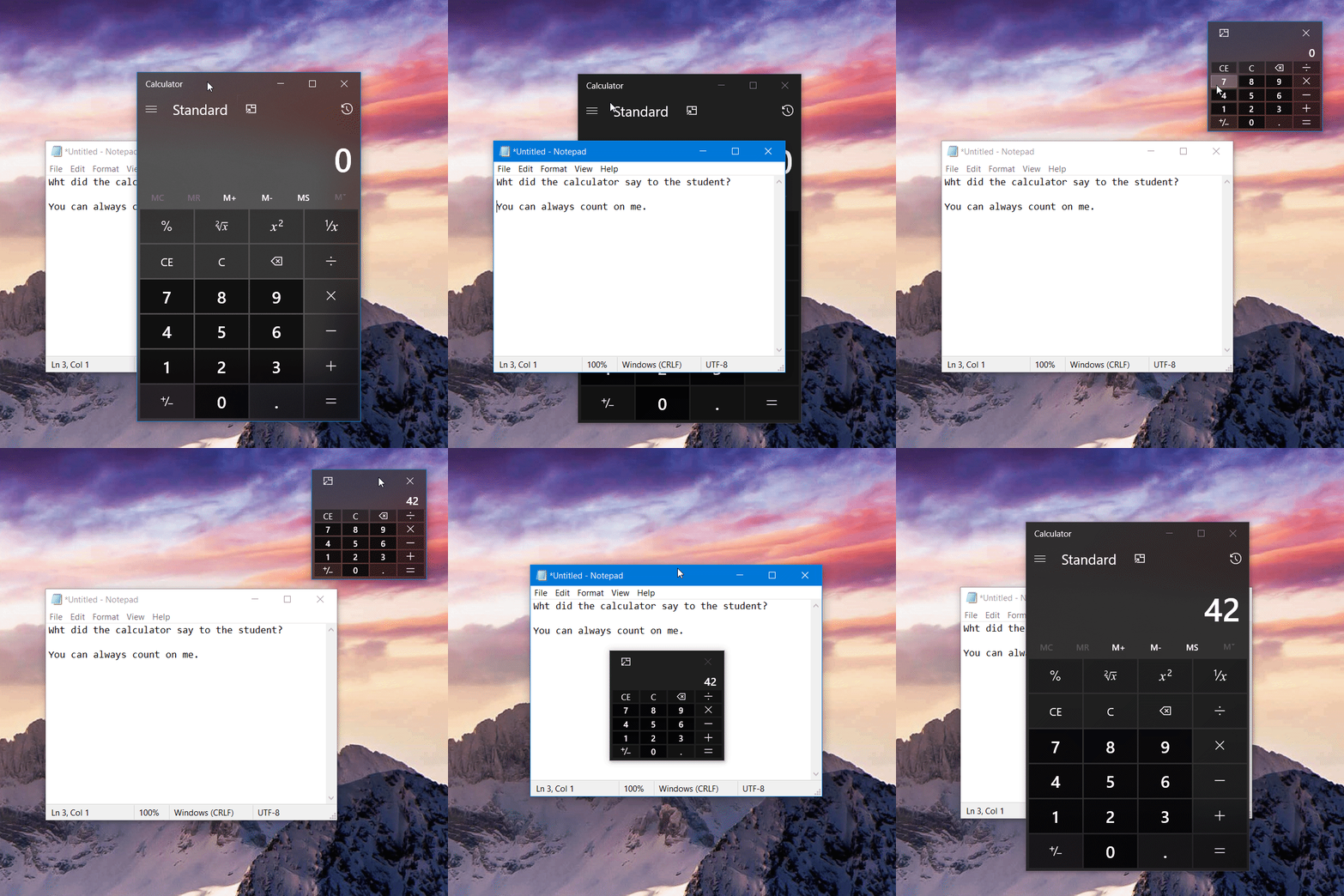
None of these three apps are explicitly opening any webpages that require interception by MSEdgeRedirect; yet alll of them, and some others, will crash immediately when MSEdgeRedirect is launched, or refused to launch properly when MSEdgeRedirect is already running.
The most glaring example is Calculator: its window frame will flash briefly on the screen for some moments, immediately closing itself. The screen companions of .Eyes (XEyes.exe) will fail to load and also take down the .Eyes Gallery app (XEyes.Gallery.Uwp.exe, which allows choosing an individual companion) along with it.
This issue doesn't affect all UWP apps, however. Other UWP apps work just fine, including some that make heavy use of web interface and pages (such as Microsoft Store, News and Weather apps, and other third party software), and no noticeable effects whatsoever on most UWP apps.
Most other software, such as Win32 applications (e.g., the classic Calculator app) don't seem, to be affected at all.
Perhaps other users might indicate other affected apps and programs, UWP or otherwise.
I'm very sorry it has taken me forever to figure out what was going on.
Now that I know, however, I implore you to fix it as soon as you can; without this fix, MSEdgeRedirect sadly becomes a very useful tool that I no longer has been a joy for daily usage.

Preflight Checklist
microsoft-edge:https://google.comredirects successfullyInstall Type
New Install
Install Mode
Service Mode
Steps to reproduce
✔️ Expected Behavior
These UWP apps should spawn their own windows or mini windows as appropriate and expected.
❌ Actual Behavior
With MSEdgeRedirect activated, these apps will fail to load altogether, or in some other cases, cause a partial system crash, taking other programs down as well.
Illustrative image (taken from here): although the root cause and apps in question are different, this is exactly the effect I get when trying to open the apps I mentioned above.

Microsoft Windows version
Windows 10 22H2
MSEdgeRedirect version
0.8.0.0
Other Software
This took me forever to figure out but I've finally realized MSEdgeRedirect is the culprit!!
XEyes.exe), a cosmetic companion piece of software that spawns cartoony wide-eyed figures and even old MS Office Assistants, whose eyes will follow the cursor on the screen.None of these three apps are explicitly opening any webpages that require interception by MSEdgeRedirect; yet alll of them, and some others, will crash immediately when MSEdgeRedirect is launched, or refused to launch properly when MSEdgeRedirect is already running.
The most glaring example is Calculator: its window frame will flash briefly on the screen for some moments, immediately closing itself. The screen companions of .Eyes (
XEyes.exe) will fail to load and also take down the .Eyes Gallery app (XEyes.Gallery.Uwp.exe, which allows choosing an individual companion) along with it.This issue doesn't affect all UWP apps, however. Other UWP apps work just fine, including some that make heavy use of web interface and pages (such as Microsoft Store, News and Weather apps, and other third party software), and no noticeable effects whatsoever on most UWP apps.
Most other software, such as Win32 applications (e.g., the classic Calculator app) don't seem, to be affected at all.
Perhaps other users might indicate other affected apps and programs, UWP or otherwise.
I'm very sorry it has taken me forever to figure out what was going on.
Now that I know, however, I implore you to fix it as soon as you can; without this fix, MSEdgeRedirect sadly becomes a very useful tool that I no longer has been a joy for daily usage.