Environment
Vuetify Version: 4.0.5
Vue Version: 3.5.32
OS: macOS 10.15 (current)
Steps to reproduce
- Create color default for VBtn in the global config
- Open v-date-input and select any date range
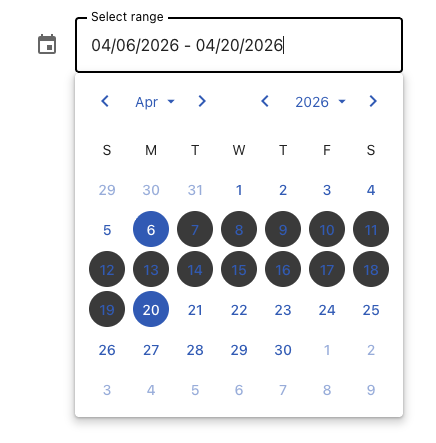
- Notice that dates between the start and end of the range render with black backgrounds
- Unfocus the input so the popover closes
- Reopen the popover by focusing the input again
- Notice that the selected range now renders with correct backgrounds
Expected Behavior
All date buttons should use consistent colors in range mode
Actual Behavior
Date buttons within the selected range render with black backgrounds and remain that way until the popover is closed. Reopening the date range picker causes them to render correctly.
Reproduction Link
https://play.vuetifyjs.com/#...
Other comments
Likely related to multiple="range" changes in V4 as this worked correctly in V3
Images


Environment
Vuetify Version: 4.0.5
Vue Version: 3.5.32
OS: macOS 10.15 (current)
Steps to reproduce
Expected Behavior
All date buttons should use consistent colors in range mode
Actual Behavior
Date buttons within the selected range render with black backgrounds and remain that way until the popover is closed. Reopening the date range picker causes them to render correctly.
Reproduction Link
https://play.vuetifyjs.com/#...
Other comments
Likely related to
multiple="range"changes in V4 as this worked correctly in V3Images