A cross-platform Python application for tracking open windows (Windows & macOS) with an immersive "House View" visualization that brings your computer usage to life!
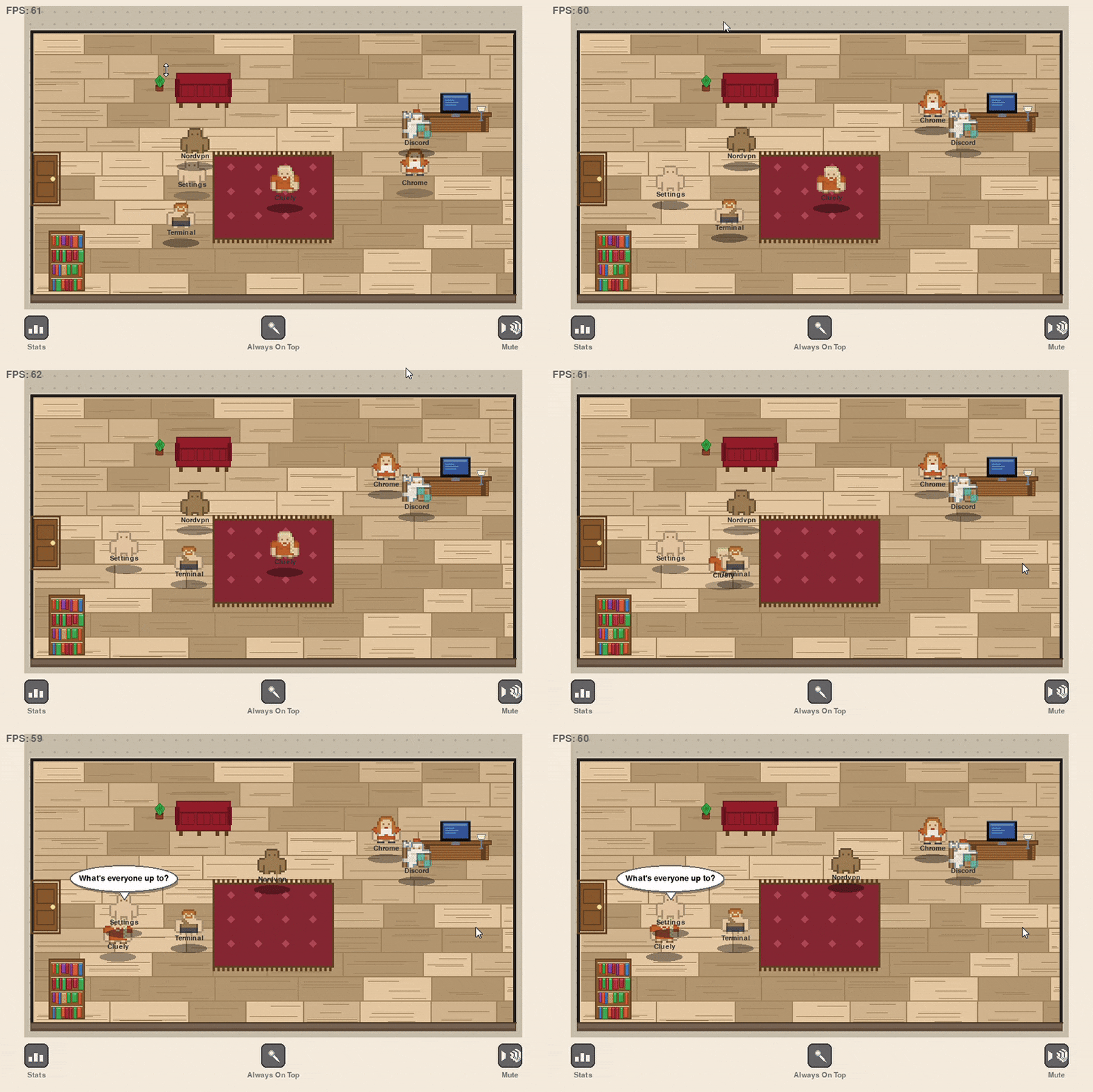
Watch your apps come alive as personas:
- Open an app - Someone enters through the door
- Close an app - They say goodbye and exit through the door
- Active window - Golden glow with floating particles
- Idle time - Characters wander around the house naturally
- Speech bubbles - See what they're saying in real-time
Speech System (currently hardcoded):
- Entry: "Hello everyone!", "Just arrived!", "Knock knock!" (when app opens, after initial load)
- Active: "Check this out!", "In the zone!", "Pay attention to me!" (when focused)
- Idle: "Just hanging out", "What's everyone up to?", "Yawn..." (random, 30-90s intervals)
- Exit: "Goodbye!", "See you later!", "Peace out!" (when closing)
- Staggered timing: Each persona has independent speech intervals to prevent coordination
- Grace period: 3-second delay before new apps can speak
window-tracker/
├── main.py                         # Application entry point
├── config.py                       # Configuration constants
├── requirements.txt                # Platform-specific dependencies
├── assets/
│   └── Spritesheet/               # Kenney roguelike character sprites
│       └── roguelikeChar_transparent.png
├── core/
│   ├── data_models.py             # WindowInfo dataclass
│   ├── window_tracker_base.py     # Abstract tracker interface
│   ├── window_tracker_windows.py  # Windows implementation (win32gui)
│   ├── window_tracker_macos.py    # macOS implementation (Quartz/AppKit)
│   ├── window_tracker_factory.py  # Platform detection & creation
│   ├── time_tracker.py            # Background thread tracking
│   ├── personification.py         # Persona generation & friendly names
│   └── simulation.py              # Test simulation mode
├── gui/
│   ├── pygame_house_view.py       # Main house visualization (60 FPS)
│   ├── pygame_sprites.py          # Sprite classes (Persona, Door, Speech)
│   ├── sprite_loader.py           # Sprite sheet loader & character manager
│   ├── pygame_particles.py        # Particle system (optimized)
│   └── pygame_sounds.py           # Procedural sound generation
└── utils/
    ├── formatters.py              # Time formatting helpers
    └── logger.py                  # Logging setup
- Windows or macOS
- Python 3.7+
# Install dependencies (automatically installs platform-specific packages)
pip install -r requirements.txt

# Windows only: Post-install for pywin32 (if needed)
python Scripts/pywin32_postinstall.py -install
Platform-Specific Notes:
- Windows: Uses Windows API via
pywin32andpsutil - macOS: Uses Quartz and AppKit frameworks via
pyobjc- May require granting accessibility permissions on first run
- Go to System Preferences → Security & Privacy → Privacy → Accessibility
python main.pyControls:
- ESC - Exit application
- Stats Button (bottom-left) - View app usage statistics
- Always On Top Button (bottom-center) - Toggle always-on-top mode
- Mute Button (bottom-right) - Toggle sound on/off
Configuration:
- Edit
config.pyto change default settings ALWAYS_ON_TOP = True/False- Start with window always on top
Click the Stats button (bottom-left) to view:
- App names with matching sprite icons from house view
- Total open time - How long each app has been running
- Active time - How long each app has been focused
- Focus % - Visual progress bar showing (active ÷ total) × 100
- Color-coded bars:
- Green (>70%) - High focus (actively used most of the time)
- Orange (30-70%) - Medium focus (moderate attention)
- Gray (<30%) - Low focus (mostly idle/background)
- Shows top 8 apps sorted by total open time
- Golden highlight for currently active app
- Same sprites as house view for visual consistency
- Platform abstraction layer - factory creates appropriate tracker for OS
- Windows: Uses
win32guito enumerate windows,GetForegroundWindow()for active window - macOS: Uses
CGWindowListCopyWindowInfo(Quartz) andNSWorkspace(AppKit) - Polls every 1 second for updates
- Filters out system windows, toolbars, and the tracker itself
- Self-exclusion: App doesn't track its own window
- Total Open Time: Wall clock time since window appeared
- Active Time: Cumulative focus time
- Background thread with thread-safe dict
- Mutex locks prevent race conditions
Click the Mute button (bottom-right) or edit config:
# In gui/pygame_house_view.py
self.sounds = SoundManager(enabled=False)self.sounds.play('hello', volume=0.8) # Louder
self.sounds.play_ambient(volume=0.02) # QuieterIn gui/pygame_sprites.py:
self.move_progress += dt * 1.2 # Faster (default: 0.3)In gui/pygame_house_view.py (__init__):
self._wander_interval_min = 5.0   # More frequent (default: 12.0)
self._wander_interval_max = 15.0 # (default: 40.0)In gui/pygame_house_view.py (__init__):
self._speech_interval_min = 10.0  # More frequent (default: 30.0)
self._speech_interval_max = 30.0  # (default: 90.0)
self._speech_duration = 8.0 # Longer display (default: 5.0)At the top of gui/pygame_house_view.py (module-level constants):
ENTRY_TEXT_OPTIONS = [
    "Hello everyone!",
    "Custom entry message!",
    # Add your own messages
]

IDLE_TEXT_OPTIONS = [
    "Just hanging out",
    "Custom idle message!",
    # Add your own messages
]- Click the Pin button (bottom-center) to toggle at runtime
- Or set default in
config.py:ALWAYS_ON_TOP = True
Logs written to window_tracker.log:
- Window tracking events
- Persona creation/removal
- Animation states
- Button interactions
- Errors and warnings
- Watch your workflow patterns emerge
- See which apps dominate your "house"
- Use as a productivity awareness tool
- Show it off to colleagues
- Make it a game to minimize house population
- Notice how apps naturally spread out over time
- Track your most-used apps with the stats overlay
- Windows & macOS supported
- Windows: Tested on Windows 10/11
- macOS: Requires accessibility permissions for window tracking
- Some security software may need to whitelist the app
- Does not capture window content, only titles
- Safe and privacy-focused
- Self-exclusion: The tracker doesn't track itself
- Linux: Not currently supported (PRs welcome!)
Creative Commons CC0 1.0
- pygame
- Character sprites from Kenney's Roguelike Pack (CC0 License)