
Watch videos together, in sync. An unofficial Syncplay client for Android & iOS.
The "k" stands for Kotlin.




| Recommended | Alternative | Store | |
|---|---|---|---|
| Android |

|
|
|
| iOS |

|
|
|
Notes on downloads
- Android (GitHub): Each release ships per-ABI APKs plus a
universalone. Most modern phones wantarm64-v8a; pickuniversalif unsure. - Android (IzzyOnDroid): A smaller APK built from the
exoOnlyflavor, carrying only the ExoPlayer engine (no bundled mpv/VLC native libraries). It uses package idcom.reddnek.syncplay, so it installs alongside the GitHub / Play Store build (com.yuroyami.syncplay) rather than updating it. Keep one or the other to avoid two copies. - Android (Play Store): Same build as GitHub, but a new version can appear here a little later because of store review.
- iOS: The "Download IPA" button always points to the latest release. No App Store access? Sideload via AltStore with no jailbreak, or install the
.ipadirectly. See the iOS install guide for both paths.
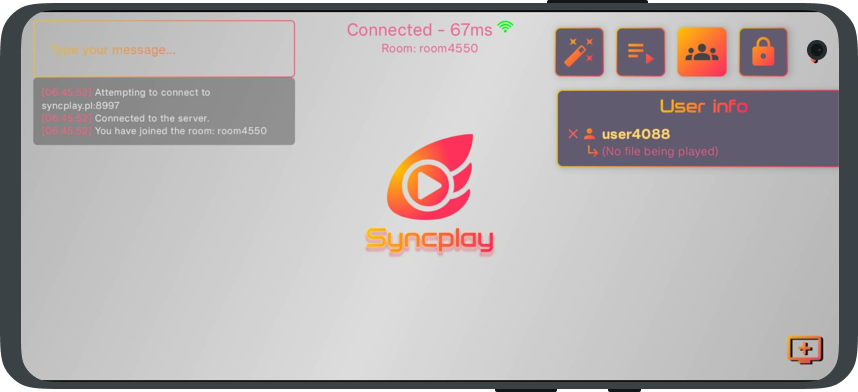
- Syncplay compatible. Connects to the same servers and works alongside the official PC client. Position, pause, seek, and speed stay in sync.
- Protocol rewritten from Python to Kotlin, covering every core feature.
- Multiple video engines, including mpv on both platforms. Switch player at runtime to suit your device and format.
- Real-time chat with emoji and inline GIFs.
- Shared playlists for sequential group viewing, with auto-advance.
- Managed rooms and a readiness system.
- Picture-in-Picture (Android, and iOS on AVPlayer or VLCKit).
- TLS encryption for secure connections.
- Built-in server. Host a room straight from the app, no PC required.
- Solo mode. Watch on your own with no server, from the solo button in the About popup.
- Privacy controls. The filename and file size you share with a room can be hashed or withheld.
- Deep customization. Settings for the UI, playback, gestures, and haptics.
- Multi-language via community translations.
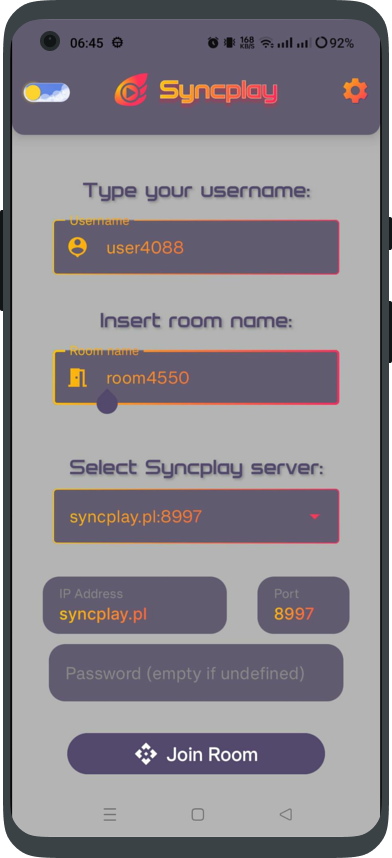
- Open the app and enter a username and a room name.
- Pick a server (the official
syncplay.plis preselected) and a port (8995–8999). Add a password only if your server needs one. - Tap Join, then load a video from device storage or paste a direct URL.
- Anyone in the same room on the same file plays in sync, mobile or PC.
No server of your own? Use the built-in server to host a room, or solo mode to watch offline.
Switch engines at runtime in the room settings. ✔ in Default marks the engine selected out of the box.
Android
| Engine | Default | Formats | Subtitles | Chapters | Notes |
|---|---|---|---|---|---|
| mpv (libmpv) | ✔ | Broad (HEVC, mkv, …) | Best (libass) | ✔ | Recommended: best subtitles and performance |
| VLC (libVLC) | ✗ | Broad | ✔ | ✔ | Experimental |
| ExoPlayer (Media3) | ✗ | Device codecs | Basic | ✗ | Lightweight; the only engine in the exoOnly / IzzyOnDroid build |
iOS
| Engine | Default | Formats | Subtitles | Chapters | Notes |
|---|---|---|---|---|---|
| MPVKit (libmpv) | ✔ | Broad (HEVC, mkv, …) | Best (libass) | ✔ | New in v0.22.2; recommended |
| VLCKit 4 | ✗ | Broad | ✔ | ✔ | Good fallback; supports external subtitles and chapters |
| AVPlayer (AVFoundation) | ✗ | Device codecs | ✗ | ✗ | Native Apple player; no external subtitles or chapters |
Built with Kotlin Multiplatform and Compose Multiplatform: one shared codebase for Android and iOS. The networking and sync protocol is a direct port of the official Syncplay client.
| Layer | Technology |
|---|---|
| UI | Compose Multiplatform |
| Networking | Netty (Android) · SwiftNIO (iOS) · Ktor (shared fallback, no TLS) |
| Players | See Video Engines |
Mobile adds: Picture-in-Picture, gesture controls (double-tap seek, swipe brightness/volume), haptic feedback, GIF chat, a built-in server, runtime engine switching, solo/offline mode, custom themes, and Android TV support.
Not yet ported from desktop: the command-line interface, persistent server rooms (the built-in server is in-memory only), the file-switch manager, and per-user time offset.
Can I watch with friends who use Syncplay on PC?
Yes, fully compatible. Same protocol, same servers, same core features.
Android says "App not installed" when updating?
You are likely mixing release channels. The IzzyOnDroid build (
com.reddnek.syncplay) and the GitHub / Play build (com.yuroyami.syncplay) are separate apps and cannot update over each other. Uninstall the old one first, then install the build you want.
I don't have access to the iOS App Store.
Sideload via AltStore (no jailbreak required) using the shipped source, or install the
.ipadirectly.

Add or improve translations on Weblate by clicking the badge above.
Thanks to @Zhaodaidai (Chinese), @DoncanC (Spanish), and @ivy-reps (Russian) for their translations.
Requirements: a recent Android Studio (Narwhal / 2025.2+), and Xcode 16.3+ for iOS.
Android: clone the repo and open it in Android Studio. No extra configuration needed. Two product flavors are available:
full(default): ExoPlayer + mpv + VLC.exoOnly: ExoPlayer only, used for the IzzyOnDroid build. Select it with-PexoOnly=trueor the matching Gradle variant.
iOS: run pod install in iosApp/, then open iosApp.xcworkspace (not the .xcodeproj) in Xcode and build for arm64.
- Official Syncplay for building and maintaining Syncplay
- Et0h for his work on official Syncplay and help in our issue tracker
- soredake for thorough testing
- Osanosa for valuable contributions
- Everyone who contributed translations
Open an issue for bugs or feature requests, or start a discussion for general questions.
Licensed under AGPL-3.0